
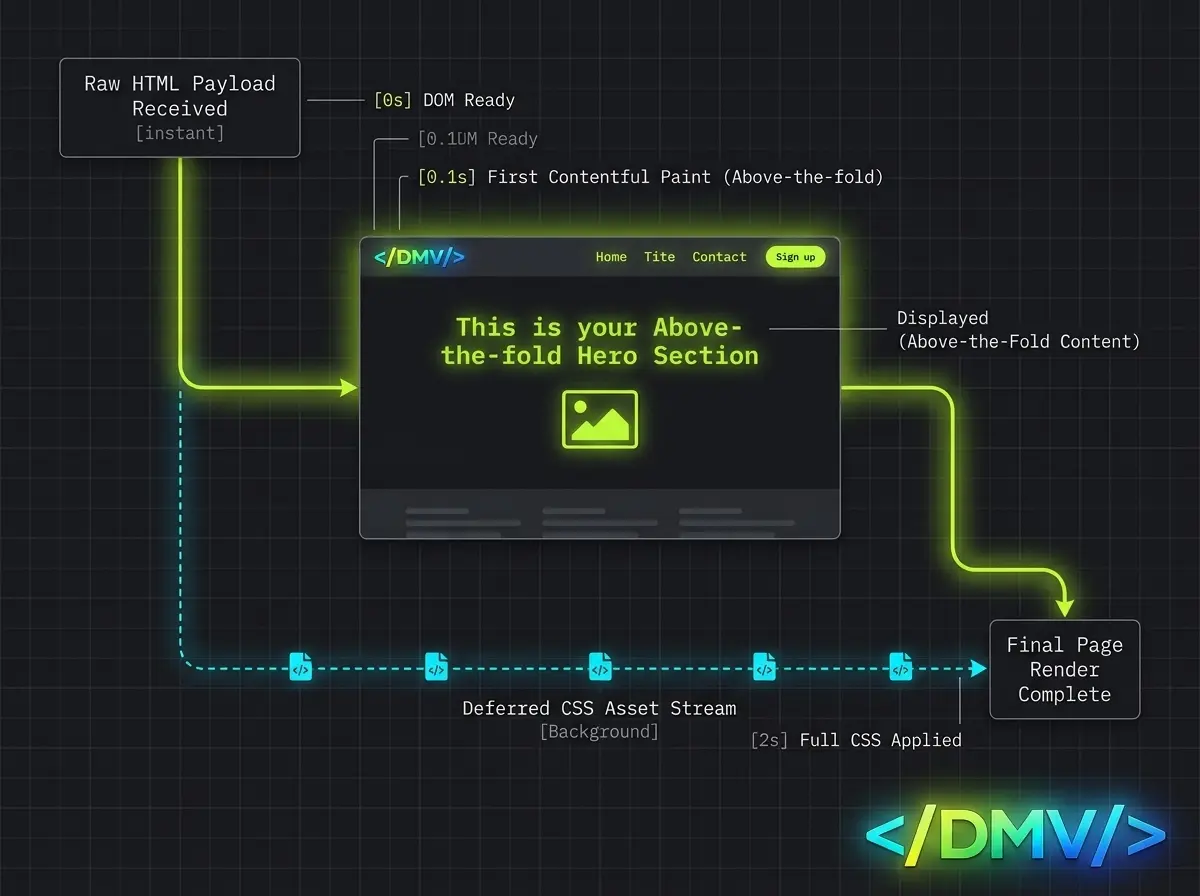
What is Critical CSS Performance Optimization? It is the strategic process of identifying the minimal CSS rules required to style above-the-fold content, inlining those styles directly into your HTML document, and deferring the rest. By executing this optimization, you prevent the browser from pausing the rendering engine to download massive external stylesheets. This eliminates render-blocking bottlenecks and significantly improves your Largest Contentful Paint (LCP) and First Contentful Paint (FCP) scores.
When a browser encounters a standard <link rel="stylesheet"> tag, it is forced to stop drawing the page until that entire file is downloaded, parsed, and executed. To achieve sub-second loading metrics, you must rethink how CSS is delivered.
The Problem: How CSS Blocks the Rendering Engine
By default, CSS is a render-blocking resource. Browsers are inherently perfectionists; they refuse to display raw, unstyled HTML because it results in a jarring user experience (often referred to as a Flash of Unstyled Content, or FOUC).
When a user requests a webpage, the browser’s HTML parser begins reading the code from top to bottom. The moment it hits an external CSS file in the <head>, it halts the rendering process. It will not paint a single pixel on the screen until that stylesheet is fully fetched over the network and processed. If your application relies on a massive, bundled CSS file—filled with styles for footers, popups, and deep internal pages—the user is left staring at a blank white screen. This delay destroys your LCP metric.
The Execution: Mastering Critical CSS Performance Optimization
To pass Core Web Vitals, you need to decouple the styles needed right now from the styles needed later. Critical CSS Performance Optimization achieves this by serving just enough CSS to paint the initial viewport instantly.
Here is the engineering protocol to extract, inline, and defer your styles for maximum performance.
Step 1: Identify and Isolate Critical Styles
Critical CSS refers exclusively to the rules required to render the content that appears immediately to a user before they scroll (the “above-the-fold” content). This typically includes the general page layout grid, header, navigation elements, hero typography, and the first content section.
Manually extracting these styles is virtually impossible for modern, dynamic web applications. Instead, you must use automated extraction tools like Penthouse or Critical. These tools utilize a headless browser to load your webpage at various viewport sizes, compute exactly which CSS selectors are applied to the visible elements, and output a minimized critical stylesheet.
Step 2: Inline Critical CSS in the <head>
Once you have isolated your critical styles, they must be removed from your external stylesheet and placed directly into the HTML document inside a <style> tag.
Because the CSS is physically embedded in the HTML payload, the browser does not have to open a new network connection or wait for an additional HTTP request to resolve. The browser parses the HTML and immediately paints the above-the-fold content in milliseconds.
HTML
Step 3: Asynchronously Load the Remaining CSS
With the initial viewport styled, you still need to load the rest of your application’s CSS (the non-critical styles) for the content below the fold. However, if you load it normally, it will still block the rendering of subsequent elements.
The industry standard for loading non-critical CSS without blocking the rendering engine involves the rel="preload" attribute paired with an onload event handler.
HTML
Here is exactly how this pattern works:
-
rel="preload" as="style"tells the browser’s preload scanner to fetch the CSS file immediately in the background at a high priority, without blocking the main thread. -
onload="this.onload=null;this.rel='stylesheet'"uses a tiny snippet of inline JavaScript. Once the file finishes downloading, it swaps therelattribute tostylesheet, seamlessly applying the styles to the page. -
The
<noscript>tag acts as a fallback, ensuring the page still receives full styling if a user has JavaScript disabled.
Automating the Workflow
Implementing Critical CSS Performance Optimization manually for every page template is not scalable. For enterprise environments, this process must be integrated into your build pipeline (using Webpack, Gulp, or Vite) or handled dynamically via a server-side module. In a WordPress ecosystem, advanced caching plugins often handle this automatically by generating critical CSS payloads per post type on their own remote servers, then injecting them into your rendered HTML.
Frequently Asked Questions
[lux_faq htag="h3" open="first" style="card"]
Q:What is Critical CSS in web performance?
Critical CSS refers to the minimum set of styles required to correctly render the webpage content that appears immediately to a user before scrolling. Inlining this data prevents render-blocking delays, significantly lowering LCP times.
Q:Does inlining CSS prevent browser caching?
A:Yes. Inlined CSS is not cached separately by the browser like an external .css file; it is downloaded every time the HTML is requested. This is why you must keep your critical CSS payload incredibly small (ideally under 14KB) so it fits within the first TCP packet round-trip.
Q:Why does my page flash unstyled content (FOUC) when I defer CSS?
A:A Flash of Unstyled Content occurs when you defer your main stylesheet but fail to correctly identify and inline all the necessary critical styles. The browser renders the raw HTML, and milliseconds later, the deferred stylesheet kicks in, causing the layout to snap into place. Proper critical CSS extraction prevents this.
Q:What is the difference between preload and defer for CSS?
A:Preload (rel="preload") instructs the browser to download the file in the background immediately without blocking rendering, applying it only when triggered via JavaScript. Deferring is a concept usually applied to JavaScript; for CSS, the preload-and-swap method is the standard way to achieve a deferred execution.
Q:How does Critical CSS impact Core Web Vitals?
A:By eliminating the time the browser spends waiting for CSS files to download before painting, you drastically improve First Contentful Paint (FCP) and Largest Contentful Paint (LCP). Additionally, ensuring the page layout is stable immediately upon render helps prevent Cumulative Layout Shift (CLS).
[/lux_faq]
Engineering a Faster Front-End
Optimizing your rendering path is not just about writing cleaner code; it is about respecting how the browser parses information. By implementing Critical CSS Performance Optimization, you take absolute control over your page lifecycle. Audit your application’s render-blocking resources today, extract your critical styles, and give your users the instant loading experience they expect.
