
Every time a malicious bot pings your website, it costs you hardware resources. Many administrators mistakenly rely on heavy, application-level PHP plugins to handle WordPress server security. However, this approach is fundamentally flawed for high-traffic environments.
By the time a malicious payload, scraper, or brute-force attack reaches your WordPress application layer, it is already consuming valuable PHP workers, RAM, and CPU cycles. Application-level plugins must execute PHP and query your database just to figure out if a user should be blocked. If your origin server is busy fighting off a botnet internally, it cannot serve fast page loads to legitimate users. True WordPress server security requires moving your defenses off the origin server and out to the edge.
The Execution: Deploying an Edge Web Application Firewall (WAF)
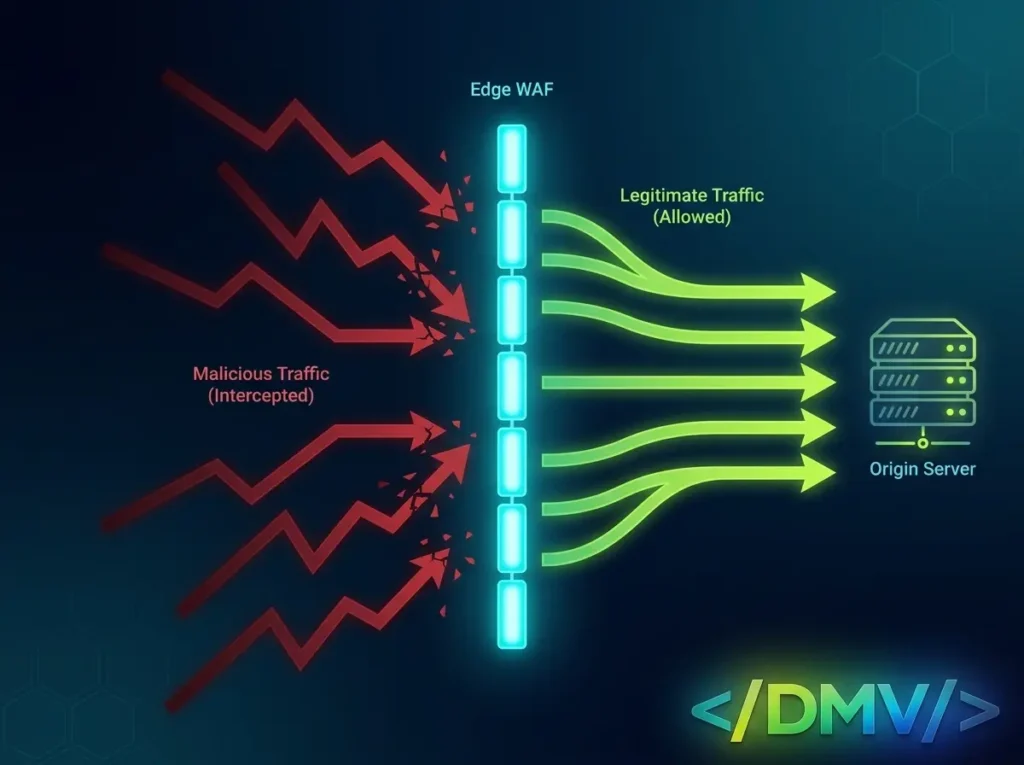
To implement enterprise-grade WordPress server security, you must deploy a Web Application Firewall (WAF) at the DNS level, utilizing networks like Cloudflare, AWS Shield, or Sucuri. This zero-trust architecture acts as an impenetrable shield, evaluating and filtering traffic before it ever connects to your hosting infrastructure.
Here is how to architect robust WordPress server security at the edge:
Intercept at the DNS Level
By proxying your DNS records through an edge network, the public IP address of your origin server is hidden. Attackers can only see the IP of the firewall. This prevents malicious actors from bypassing your security rules and launching direct DDoS attacks against your infrastructure.
Implement Strict Rate Limiting
Brute-force attacks against wp-login.php or xmlrpc.php are the most common threats to WordPress server security. Instead of letting your server process thousands of failed password attempts, configure your Edge WAF to enforce rate limiting. If a single IP address requests the login URL more than five times in one minute, the WAF will automatically drop the connection at the edge, saving your server from exhaustion.
Challenge Suspicious IPs
You do not have to permanently block traffic to stay secure. A sophisticated WAF allows you to issue Managed Challenges (like silent JavaScript checks or CAPTCHAs) to traffic originating from high-risk countries, known Tor exit nodes, or data centers. Legitimate users pass the test seamlessly, while automated botnets fail and are turned away.
Block Known Malicious User Agents
Automated vulnerability scanners constantly crawl the web looking for outdated plugins. You can significantly improve your WordPress server security by configuring firewall rules that instantly block HTTP requests containing user-agent strings associated with known scrapers, spam bots, and vulnerability probing tools.
Frequently Asked Questions
[dmv_faq htag=”h3″ open=”none” style=”card”]
Q:Why is server-level security better than WordPress security plugins?
A:Server-level security, such as an Edge WAF, intercepts and drops malicious traffic before it ever reaches your hosting infrastructure. Application-level plugins must load WordPress core and PHP to block an attack, which can still lead to server resource exhaustion during a DDoS event. By focusing on WordPress server security at the edge, you protect your origin server’s uptime.
Q:What is a Web Application Firewall (WAF)?
A:A WAF is a security protocol that monitors, filters, and blocks malicious HTTP traffic traveling to a web application. It is the absolute cornerstone of modern WordPress server security, protecting against SQL injections, cross-site scripting (XSS), and automated brute-force attacks.
Q:Will an Edge WAF slow down my legitimate users?
A:No. In fact, it typically speeds up the user experience. A properly configured WAF running on a global edge network stops bad traffic from hogging your CPU and RAM, ensuring your server remains incredibly fast and responsive for real human visitors.
Q:Do I still need a security plugin if I have an Edge WAF?
A:While an Edge WAF handles the heavy lifting of WordPress server security by blocking external network threats, a lightweight internal plugin can still be useful. You can use it for internal malware scanning, enforcing strong user passwords, and monitoring user activity logs within the dashboard.
Q:How do I protect the WordPress login page specifically?
A:The most effective WordPress server security tactic for the login page is to set up a WAF page rule that forces an interactive challenge (like Cloudflare Turnstile) whenever an unrecognized IP attempts to access wp-login.php. This guarantees only humans can attempt a login.
[/dmv_faq]
Fortifying Your Perimeter
Reactive security is a liability. Waiting for a threat to hit your WordPress dashboard before deciding what to do with it is a recipe for downtime. By adopting a zero-trust edge architecture and prioritizing strict WordPress server security, you ensure your infrastructure is dedicated solely to serving your customers—not battling automated bots.
