When architecting an enterprise-grade website, developers often look for the quickest place to drop custom code snippets. Usually, this means pasting scripts directly into a theme’s functions.php file. However, this is a fundamentally flawed approach that introduces massive technical debt. If you want to enforce code execution at the server level, you must understand how to leverage WordPress Must-Use Plugins (often referred to as mu-plugins).
By utilizing a dedicated mu-plugins directory, you guarantee that your critical infrastructure code—such as custom security scripts, API modifications, or custom post type registrations—loads automatically, cannot be accidentally deactivated, and remains completely independent of the visual theme.
Why the functions.php File is a Liability
In the WordPress ecosystem, themes dictate presentation, while plugins dictate functionality. Over the years, this line has blurred, leading administrators to dump complex backend logic into the active theme’s functions.php file.
The danger of this practice is immediate. If you decide to redesign your website and switch themes, or if a developer pushes a theme update that overwrites your file, your entire architecture breaks. Suddenly, your custom user roles vanish, your security headers stop firing, and your API integrations drop offline.
To achieve architectural superiority, your core business logic must survive a theme change. This is the exact problem that WordPress Must-Use Plugins are designed to solve.
The Execution: Mastering WordPress Must-Use Plugins
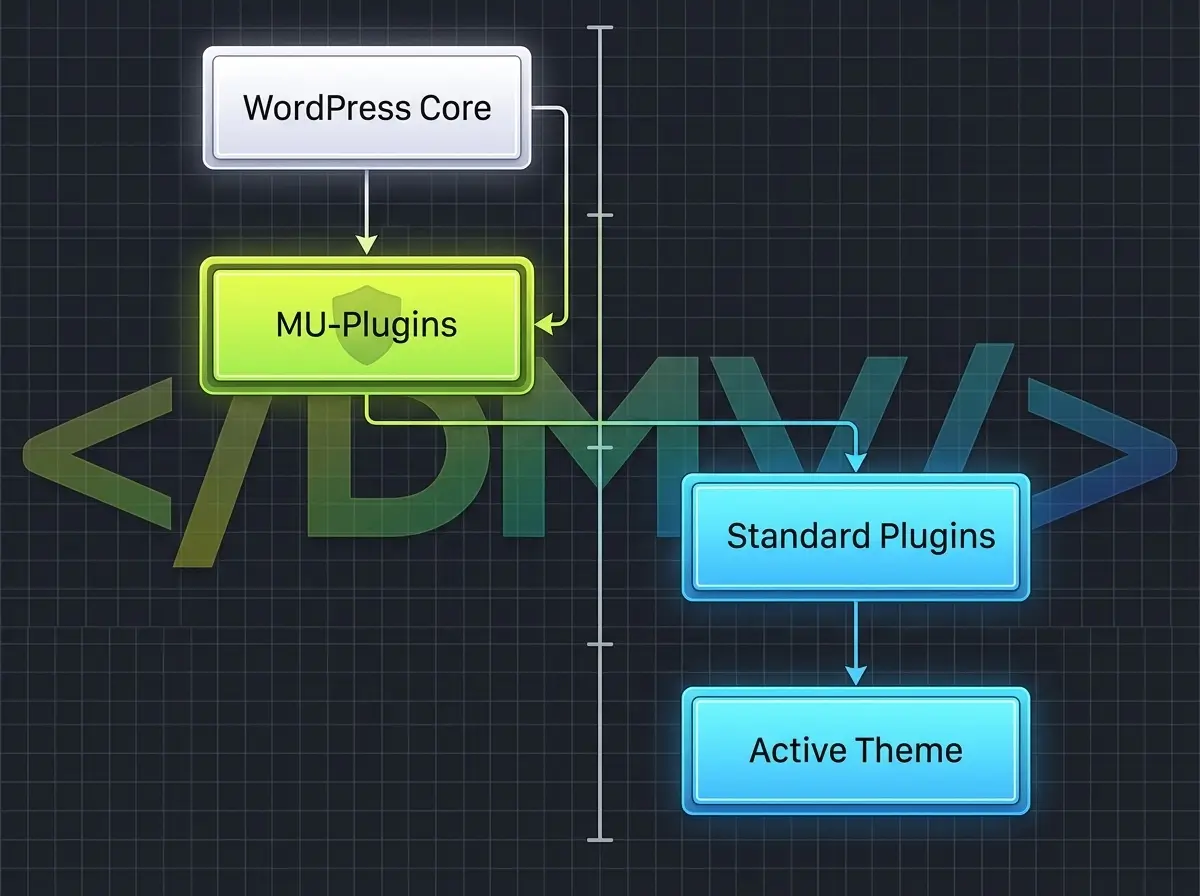
The mu-plugins directory is a highly privileged folder within your WordPress installation. Files placed in this directory are loaded before normal plugins and execute automatically on every page load.
Here is how to properly deploy a WordPress Must-Use Plugins architecture:
1. Create the Directory
By default, the mu-plugins folder does not exist on a fresh WordPress install. Using an SFTP client or SSH, navigate to your /wp-content/ directory and create a new folder named exactly mu-plugins.
2. Deploy Your PHP Files
Unlike standard plugins, WordPress does not scan subdirectories inside the mu-plugins folder by default. If you upload a complex plugin inside a subfolder, it will not execute unless you create a proxy loader file in the root of the directory. For most infrastructure tweaks, dropping a standalone .php file directly into /wp-content/mu-plugins/ is the best approach.
3. Lock Down Administration
Once uploaded, your PHP script is instantly active. If you log into the WordPress dashboard and navigate to the Plugins page, you will notice a new “Must-Use” filter link at the top. When viewing this list, you will see your script is active, but there are no “Deactivate” or “Delete” buttons. The only way to turn off WordPress Must-Use Plugins is to physically remove the file via SFTP or the server command line. This guarantees that no user, not even an Administrator, can accidentally disable your critical site architecture from the dashboard.
Best Practices for MU-Plugins
When executing custom WordPress architecture, you should not put every custom function into the must-use folder. Use it strategically for essential operations:
-
Security Enforcements: Deploy scripts that disable the WordPress REST API for unauthenticated users, or execute custom login brute-force protection.
-
Custom Post Types (CPTs): Registering your CPTs via an MU-plugin ensures that even if a theme fails, your underlying database content remains structured and accessible.
-
Performance Optimization: Since mu-plugins load alphabetically before standard plugins, you can use them to conditionally block heavy commercial plugins from loading on pages where they aren’t needed.
Frequently Asked Questions
[lux_faq htag="h3" open="first" style="card"]
Q:What is the difference between a normal plugin and an MU-plugin in WordPress?
A:A normal plugin can be deactivated by site administrators and loads after the core system. An MU-plugin (Must-Use plugin) executes automatically, loads before standard plugins, and does not appear in the standard deactivation list, making it ideal for enforcing critical site architecture.
Q:Where is the mu-plugins directory located?
A:The directory must be created inside your standard wp-content folder (e.g., /wp-content/mu-plugins/). If it does not exist, you simply create a new folder with that exact name.
Q:Do WordPress Must-Use Plugins update automatically?
A:No. Because they are hidden from the standard plugin repository system, MU-plugins do not receive automatic updates or trigger update notifications in the WordPress dashboard. Administrators are fully responsible for maintaining and updating the code manually.
Q:In what order do MU-plugins load?
A:WordPress loads PHP files located directly in the mu-plugins directory in strict alphabetical order. They are executed early in the loading sequence, before any regular plugins or theme files are loaded.
Q:Can I use activation or deactivation hooks in an MU-plugin?
A:No. Because MU-plugins are active the exact moment the file hits the server, standard WordPress activation hooks (like register_activation_hook) are completely ignored. If your script requires database table creation upon activation, you must structure the code differently to handle the initialization.
[/lux_faq]
Securing Your Future Architecture
Relying on a visual theme to hold backend business logic creates a fragile environment. By taking the time to migrate your custom functions into WordPress Must-Use Plugins, you instantly secure your code against accidental deactivation and ensure your site scales predictably. Stop letting your functions.php file dictate your infrastructure, and lock down your architecture at the server level today.
